Xontero
Актив
-
Регистрация
Everything posted by Xontero
-
Действительно? Откуда ты?
-
Просмотр файла taskmanager for more information: https://invisioncommunity.com/files/file/9932-task-manager/ Добавил Xontero Добавлено 03/17/22 Категория Модерация Язык English
-
 for more information: https://invisioncommunity.com/files/file/9932-task-manager/Free
 -
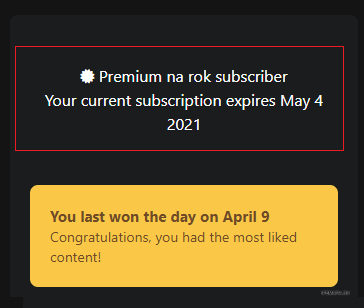
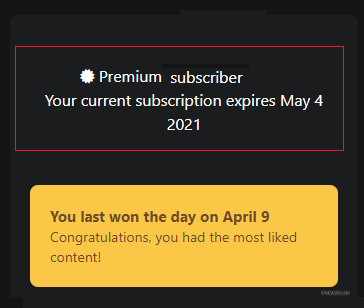
@avangcom you're from Iran!!!!!!!! follow this simple step: Go to ACP --> APPEARANCE --> Themes --> Your Theme --> Edit CSS and HTML --> Type profileSubscription in Search Box. Go to profileSubscription template. Find: <span class = 'cProfileSubscription_text' ><i class = "fa fa-certificate" ></i> {lang="nexus_subs_subscriber" sprintf="$subscription->package->_title"} </span> Change to: <span class = 'cProfileSubscription_text' > <i class = "fa fa-certificate" ></i> {lang="nexus_subs_subscriber" sprintf="$subscription->package->_title"} {{if $member->member_id == \IPS\Member::loggedIn()->member_id}} <br/> {$subscription->currentBlurb()} {{endif}} </span> output: good lock @avangcomyou're from Iran!!!!!!!! follow this simple step: Go to ACP --> APPEARANCE --> Themes --> Your Theme --> Edit CSS and HTML --> Type profileSubscription in Search Box. Go to profileSubscription template. Find: <span class='cProfileSubscription_text'><i class="fa fa-certificate"></i> {lang="nexus_subs_subscriber" sprintf="$subscription->package->_title"}</span> Change to: <span class='cProfileSubscription_text'> <i class="fa fa-certificate"></i> {lang="nexus_subs_subscriber" sprintf="$subscription->package->_title"} {{if $member->member_id == \IPS\Member::loggedIn()->member_id}} <br/> {$subscription->currentBlurb()} {{endif}} </span> output:
-
has Someone a new version Compatible with 4.6? I install this version and everything good works but when a user visit as a guest below error appear

-
For the first case, you have to search a lot. but for the second case, this feature is available by default
-
Привет У кого-нибудь есть отредактированный файл JavaScript для удаления авторских прав?
-
Thanks. But this works only for apps
-
Hi. How can I download installed plugin without using developer mode?
-
I need this language pack: https://invisioncommunity.com/files/file/7292-turkish-language-file-for-ips-4-series/
-
I need this theme: https://invisioncommunity.com/files/file/9813-rain/
-
use this instead of: https://ipbmafia.ru/files/file/2491-k4-info-to-postcontainer/
-
I have 20.3.0 Spacious ACP 20.3.0.tar Spacious ACP 20.3.0.tar
-
IPS website is not available. why?
-
If you want I can report this bug on the invision.
-
disable your apps and plugins and try again
-
Does anyone have this plugin? Link: https://invisioncommunity.com/files/file/7344-group-name-indicator/
-
ohhh... sorry this can be replace with that
-
 Приложение Интеграция с Вконтакте содержит в себе три набора функционала: 1. VK.com Login Handler - авторизация пользователей в Invision Community с помощью социальной сети Вконтакте. Инструкция по настройке. 2. VK.com Share Service - пользователи могут делиться любым контентом в сообществе с помощью одной кнопки. Подробнее. 3. VK.com Content Promotion - продвижение контента в группу или страницу Вконтакте по расписанию. Подробнее о продвижение в Вконтакте.Free
 -
View File Integration with Vkontakte Приложение Интеграция с Вконтакте содержит в себе три набора функционала: 1. VK.com Login Handler - авторизация пользователей в Invision Community с помощью социальной сети Вконтакте. Инструкция по настройке. 2. VK.com Share Service - пользователи могут делиться любым контентом в сообществе с помощью одной кнопки. Подробнее. 3. VK.com Content Promotion - продвижение контента в группу или страницу Вконтакте по расписанию. Подробнее о продвижение в Вконтакте. Submitter Xontero Submitted 02/02/22 Category Integrations
-
I need this app: https://invisioncommunity.com/files/file/8779-topics-list/
-
sorry my language is not Russian
-
saiko for forums use this in costum.css: .cForumList .cForumRow .cForumTitle::before { content: "\f27a"; background-image: linear-gradient(to left,#21f0bf,#5a8ef1) !important; font-family: fontawesome; font-size: 15px; font-weight: 600; color: #fff; } but if you want to different Icon for each forum you can use this method: .cForumList .cForumRow[data-categoryid="X"] .cForumTitle::before { content: "\f27a" !important; font-family: fontawesome; font-size: 15px; } **instead of X you should use forum ID** for widgets use this in costum.css: .cWidgetContainer[data-widgetArea="footer"] ul > li.ipsWidget .ipsType_sectionTitle::before, .cWidgetContainer[data-widgetArea="header"] ul > li.ipsWidget .ipsType_sectionTitle::before, .cWidgetContainer[data-widgetArea="footer"] ul > li.ipsWidget .ipsWidget_title::before, .cWidgetContainer[data-widgetArea="header"] ul > li.ipsWidget .ipsWidget_title::before { content: "\f27a"; font-family: fontawesome; font-weight: 600; color: #fff; } but if you want to different Icon for each widget you can use this method: .ipsWidget[data-blockid*="X] .ipsWidget_title::before { content: "\f075" !important; font-family: fontawesome; } **instead of X you should use data-blockid** good luck
-
I need this plugin: https://invisioncommunity.com/files/file/9220-pay-to-pin-topics/
-