renssis
Пользователи
-
Регистрация
-
В сети
-
-
-
English: I noticed an adjustment in IPB: when a member buys a file, the imposed limit also applies to purchased files, which is quite inconvenient. It would be advantageous to add this option to the plugin to make this adjustment easier. "Ignore download limits for purchased files" Go to > applications/downloads/sources/File/File.php Search for: if( $downloadsThisPeriod >= $restrictions[ $k . '_dl' ] ) Change it to: if( $downloadsThisPeriod >= $restrictions[ $k . '_dl' ] && !$this->isPaid() ) Russian: Я заметил одну настройку в IPB: когда участник покупает файл, установленный лимит также применяется к купленным файлам, что достаточно неудобно. Было бы полезно добавить эту опцию в плагин, чтобы упростить этот настройку. "Игнорировать лимиты скачивания для купленных файлов" Перейдите в > applications/downloads/sources/File/File.php Найдите: if( $downloadsThisPeriod >= $restrictions[ $k . '_dl' ] ) Замените на: if( $downloadsThisPeriod >= $restrictions[ $k . '_dl' ] && !$this->isPaid() ) :)
-
-
? https://invisiondevs.com/files/file/32-gateway-discounts/
-
Извините за переводчика... eu sou brasileiro. Знаете ли вы какой-нибудь плагин, который добавляет сообщение в ветку обсуждения при обновлении файла? Или что-то подобное?
-
Olá! Desculpe o meu idioma, porém eu posso ajudar: https://products.aspose.app/imaging/pt/animated-png-maker converte gif to png animated.. other option.. in discord f12 > give link.. example: Link> https://cdn.discordapp.com/avatar-decoration-presets/a_6d16b27d9415cafe3b289053644337c4.png?size=96&passthrough=false Change false to true.. Enjoy
-
-
-
update version? КОлян Email Address Confirmation 1.2.4
-
-
-
-
-
Hide info MOD: <!-- Moderator warning --> <div class="ipsType_reset ipsPad ipsAreaBackground_light ipsClearfix ipsPhotoPanel ipsPhotoPanel_mini"> {template="userPhoto" group="global" app="core" params="\IPS\Member::load( $comment->warning->moderator ), 'mini'"} <div> <strong class='ipsType_warning ipsType_normal'>{lang="member_given_post_warning" sprintf="\IPS\Member::load( $comment->warning->moderator )->name, \IPS\Member::load( $comment->warning->member )->name"}</strong> <br> <span class='ipsType_light'> <strong>{lang="warn_reason_message"}</strong> {lang="core_warn_reason_{$comment->warning->reason}"} · <strong>{lang="warn_points_message"}</strong> {$comment->warning->points} {{if member.modPermission('mod_see_warn') and $comment->warning}} · <a href="{url="app=core&module=system&controller=warnings&do=view&id={$comment->warning->member}&w={$comment->warning->id}" seoTemplate="warn_view" seoTitle="$comment->author()->members_seo_name"}" title='{lang="view_warning_details_title"}' data-ipsDialog data-ipsDialog-size='narrow'>{lang="view_warning_details"}</a>{{endif}} </span> </div> </div>

-
-
-
-
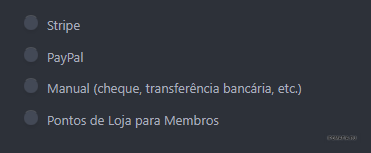
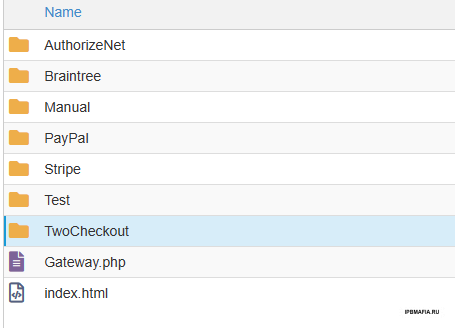
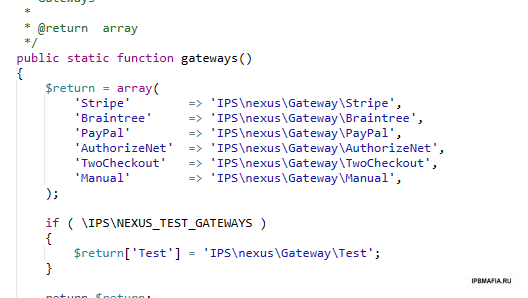
Olá! Por algum motivo eu não consigo visualizar os outros métodos de pagamento, alguém pode me ajudar? Um olá do Brasil, estou aqui na IPBMAFIA a muiiiito tempo

-
-
-
up up
-
-
close this topic, i am idiot
-
Hide Link And Code 3.3.3 This plugin does not hide the information in the widget of recent topics, does anyone know how to solve?
-
Thanks!!